No products
Prices are tax included
Product successfully added to your shopping cart
There are 0 items in your cart. There is 1 item in your cart.

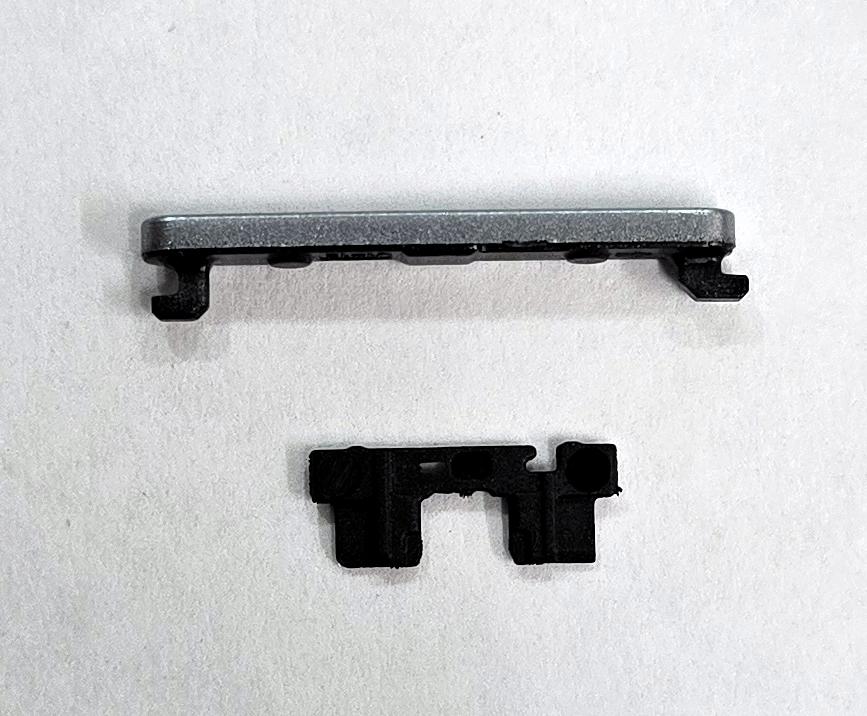
Silver volume button by Oppo A6 5G PLS120 Oppo A6 Pro 5G CPH2781 F31 5G 621014000051 Service Pack
80314
New
Disponible
Warning: Last items in stock!


Volume discounts
| Quantity | Total amount | Price 1 unit |
|---|---|---|
| 5 | €18.76 | Price €3.75 |
Silver Volume Button for Oppo A6 5G PLS120 Oppo A6 Pro 5G CPH2781 Oppo F31 5G CPH2781 621014000051 Service Pack |
|---|
The silver Service Pack volume button, part number 621014000051, is a replacement part for the Oppo A6 5G PLS120, Oppo A6 Pro 5G CPH2781 and Oppo F31 5G CPH2781. It is the external side key that operates the phone's volume up and down controls. Replacement is useful when the button shows breakage, deformation, wear or difficulty pressing due to mechanical damage. This component, corresponding to the Lunar Titanium and Cloud Grey finishes, allows the damaged external element to be renewed and its mechanical functionality restored. It is intended for professional repairs requiring work on the side button.
Specifications |
|---|
- Brand: Oppo.
- Compatible models: Oppo A6 5G, Oppo A6 Pro 5G and Oppo F31 5G.
- Technical models: PLS120 and CPH2781.
- Part Number: 621014000051.
- Component type: External side volume button.
- Color: Silver.
- Corresponding finishes: Lunar Titanium and Cloud Grey.
- Function: Mechanical operation of the volume up and down controls.
- Location: Side of the device.
- Quality: Service Pack.
Advantages |
|---|
The Service Pack volume button 621014000051 allows the damaged side key to be specifically replaced on compatible Oppo models, preserving the internal mechanisms when they remain in good condition. Its silver finish helps maintain the appearance of the device in the corresponding color variants without replacing other housing components.
Identification through the part number allows the appropriate replacement part to be selected and distinguished from other color versions used in these devices. Its mechanical function is designed to transmit volume up and down presses correctly to the internal controls.
For repair workshops, it provides a practical solution for localized repairs focused on restoring button operation and renewing the damaged external finish.
Installation Tips |
|---|
- Turn off the device, disconnect the battery and use ESD protection before starting the repair.
- Carefully disassemble the necessary components to access the side button housing.
- Remove the damaged key without harming the housing, brackets or internal operating mechanisms.
- Clean the housing and remove any dirt that could restrict button movement.
- Install the new button in its correct orientation and alignment without forcing the internal mechanisms.
- Check that the key has uniform travel and that both ends correctly operate their corresponding controls.
- Reconnect the battery and verify the volume up and down functions before completing the assembly.
Technical Table |
|---|
Brand | Compatible Models | Technical Model | Part Number | Component Type | Color | Quality |
|---|---|---|---|---|---|---|
Oppo | A6 5G / A6 Pro 5G / F31 5G | PLS120 / CPH2781 | 621014000051 | Side volume button | Silver | Service Pack |