Cart
0 Product: Products: (empty)
No products
To be determined Shipping
€0.00 Tax
€0.00 Total
Prices are tax included
Product successfully added to your shopping cart
Quantity
Total
There are 0 items in your cart. There is 1 item in your cart.
Total products (tax incl.)
Total shipping (tax incl.) To be determined
Tax: €0.00
Total (tax incl.)
Sign in
Oneplus 7T Pro repuestos
There are 27 products.Technical Characteristics of OnePlus 7T Pro Spare Parts (Repuestos)
Screen
Type: Fluid AMOLED, 90Hz, HDR10+
Size: 6.67 inches
Resolution: 1440 x 3120 pixels, 19.5:9 ratio
Protection: Corning Gorilla Glass 6
Battery
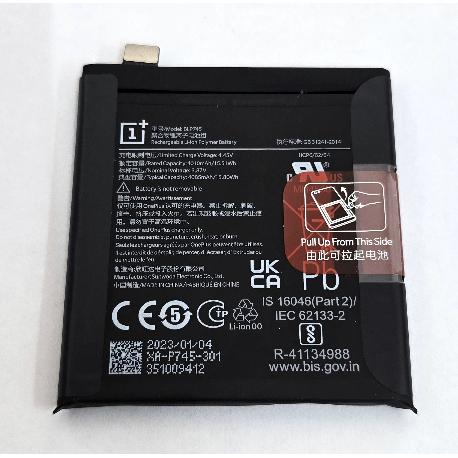
Type: Non-removable Li-Po 4085 mAh battery
Charging Port
Type: USB 3.1, Type-C 1.0 reversible connector, USB On-The-Go
Back C...
Technical Characteristics of OnePlus 7T Pro Spare Parts (Repuestos)
Screen
Type: Fluid AMOLED, 90Hz, HDR10+
Size: 6.67 inches
Resolution: 1440 x 3120 pixels, 19.5:9 ratio
Protection: Corning Gorilla Glass 6
Battery
Type: Non-removable Li-Po 4085 mAh battery
Charging Port
Type: USB 3.1, Type-C 1.0 reversible connector, USB On-The-Go
Back Cover
Material: Glass
Camera Modules
Primary Camera: Triple - 48 MP, 8 MP, 16 MP
Selfie Camera: Motorized pop-up 16 MP
Instructions on How to Replace OnePlus 7T Pro Spare Parts (Repuestos)
Replacing the Screen
- Power off the phone and remove the SIM tray.
- Use a heat gun to warm the edges of the back cover to ease adhesive removal.
- Carefully use a suction cup and a plastic pry tool to separate the back cover from the phone chassis.
- Unscrew and remove the internal screws securing the protective plate over the motherboard.
- Disconnect battery and display flex cables from the motherboard.
- Gently lift and remove the damaged screen.
- Place the new screen in position and reconnect the display flex cables.
- Reattach the protective plate and screws.
- Reapply adhesive to the back cover, and press it firmly onto the phone chassis.
- Reinsert the SIM tray and power on the phone to test the new screen.
Replacing the Battery
- Power off the phone and remove the SIM tray.
- Use a heat gun to warm the edges of the back cover to ease adhesive removal.
- Carefully use a suction cup and a plastic pry tool to separate the back cover from the phone chassis.
- Unscrew and remove the internal screws securing the battery cover.
- Disconnect the battery flex cable from the motherboard.
- Carefully pry the battery out from the adhesive holding it down using a plastic tool. Avoid bending the battery.
- Place the new battery into the compartment and secure it with the adhesive.
- Reconnect the battery flex cable to the motherboard.
- Reattach the battery cover and screws.
- Reapply adhesive to the back cover, and press it firmly onto the phone chassis.
- Reinsert the SIM tray and power on the phone to test the new battery.
Replacing the Charging Port
- Power off the phone and remove the SIM tray.
- Use a heat gun to warm the edges of the back cover to ease adhesive removal.
- Carefully use a suction cup and a plastic pry tool to separate the back cover from the phone chassis.
- Unscrew and remove the internal screws securing the charging port cover and bracket.
- Disconnect the charging port flex cable from the motherboard.
- Remove the charging port assembly from the phone.
- Place the new charging port assembly into position.
- Reconnect the charging port flex cable to the motherboard.
- Reattach the charging port cover, bracket, and screws.
- Reapply adhesive to the back cover, and press it firmly onto the phone chassis.
- Reinsert the SIM tray and power on the phone to test the new charging port.
Replacing the Back Cover
- Power off the phone and remove the SIM tray.
- Use a heat gun to warm the edges of the back cover to ease adhesive removal.
- Carefully use a suction cup and a plastic pry tool to separate the back cover from the phone chassis.
- Clean any residual adhesive from the phone chassis.
- Apply new adhesive to the edges of the phone chassis.
- Place the new back cover onto the phone and press it firmly to secure it.
- Reinsert the SIM tray and power on the phone to test the back cover.
Replacing the Camera Modules
- Power off the phone and remove the SIM tray.
- Use a heat gun to warm the edges of the back cover to ease adhesive removal.
- Carefully use a suction cup and a plastic pry tool to separate the back cover from the phone chassis.
- Unscrew and remove the internal screws securing the camera module cover.
- Disconnect the camera flex cables from the motherboard.
- Remove the existing camera modules from the phone.
- Place the new camera modules into position and secure them.
- Reconnect the camera flex cables to the motherboard.
- Reattach the camera module cover and screws.
- Reapply adhesive to the back cover, and press it firmly onto the phone chassis.
- Reinsert the SIM tray and power on the phone to test the new cameras.