No products
Prices are tax included
Product successfully added to your shopping cart
There are 0 items in your cart. There is 1 item in your cart.

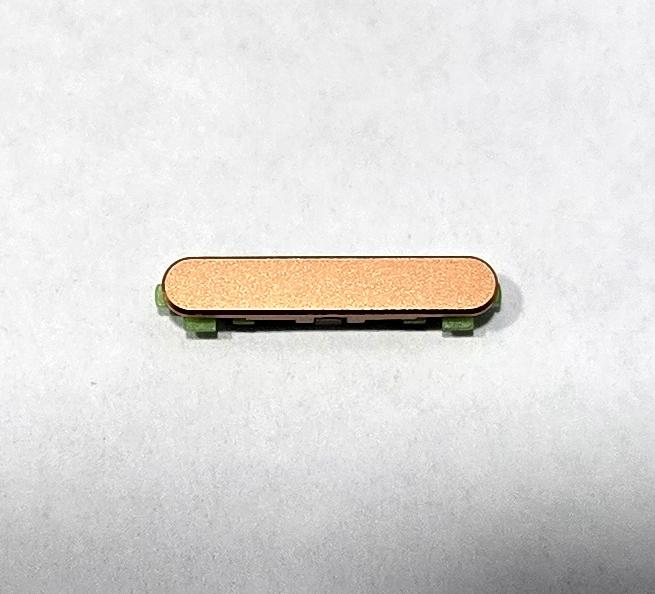
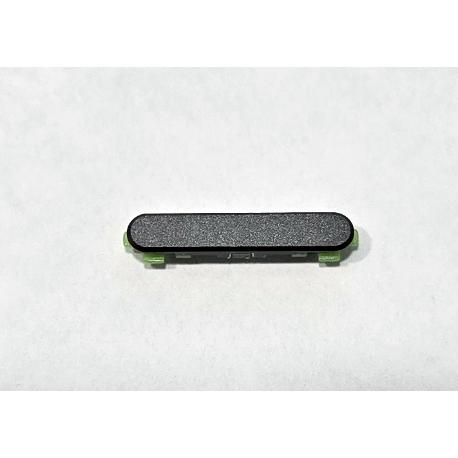
Orange AI camera button by Honor 600 Honor 600 Pro 5167AAWF Service Pack
80358
New
Disponible


Volume discounts
| Quantity | Total amount | Price 1 unit |
|---|---|---|
| 5 | €6.11 | Price €1.22 |
Orange AI Camera Button for Honor 600 VKJ-NX9 Honor 600 Pro VKP-NX9 5167AAWF Service Pack |
|---|
The Service Pack AI camera button for Honor 600 5G VKJ-NX9 and Honor 600 Pro 5G VKP-NX9, with part number 5167AAWF, is an orange replacement component designed to replace the side key dedicated to camera control and artificial intelligence functions. It allows a broken, deformed, detached or difficult-to-press external button to be replaced, restoring its mechanical operation. Its design matches the side housing of compatible models and maintains the device's orange finish. It is a component intended for professional repairs requiring replacement of the external button without replacing other components.
Specifications |
|---|
- Brand: Honor.
- Compatible models: Honor 600 5G and Honor 600 Pro 5G.
- Compatible technical models: VKJ-NX9 and VKP-NX9.
- Manufacturer part number (Part No): 5167AAWF.
- Quality: Service Pack.
- Component type: AI camera side button.
- Color: orange.
- Format: external mechanical push button.
- Location: side of the device, in the AI button housing.
- Function: activation of camera control and functions configured for the AI button.
- Application: replacement of damaged, deformed, detached or difficult-to-press buttons.
Advantages |
|---|
The Honor Service Pack 5167AAWF AI camera button restores the operation of the side key on the Honor 600 and Honor 600 Pro when the external component has mechanical damage. Its specific design facilitates fitting into the corresponding housing and preserves the orange finish of the casing. As an independent button, it allows only the damaged part to be replaced while retaining the existing electronic mechanism when it is functioning correctly. The identified part number simplifies replacement selection and component management in specialized workshops. Once installed, it allows the physical control associated with the camera and the device's configurable artificial intelligence shortcuts to be used again. It is a practical solution for localized repairs of the side assembly.
Installation Tips |
|---|
- Turn off the device, disconnect the battery and use electrostatic discharge (ESD) protection.
- Carefully access the side button housing using suitable tools.
- Remove the damaged button without forcing the fastening elements or the internal actuation mechanism.
- Clean the housing and remove any residue that could restrict movement of the new key.
- Install the Service Pack button in the correct orientation, aligning it properly with the pressing mechanism.
- Check that the button moves uniformly and returns to its original position after each press.
- Before final closure, verify camera launching and the operation of actions configured for the AI button.
- Replace the closure adhesives when necessary and check the housing fit after installation.
Technical Table |
|---|
Brand | Compatible Models | Technical Model | Part Number (Part No) | Component Type | Color | Quality |
|---|---|---|---|---|---|---|
Honor | Honor 600 5G, Honor 600 Pro 5G | VKJ-NX9, VKP-NX9 | 5167AAWF | AI camera side button | Orange | Service Pack |