
No products
Prices are tax included
Product successfully added to your shopping cart
There are 0 items in your cart. There is 1 item in your cart.

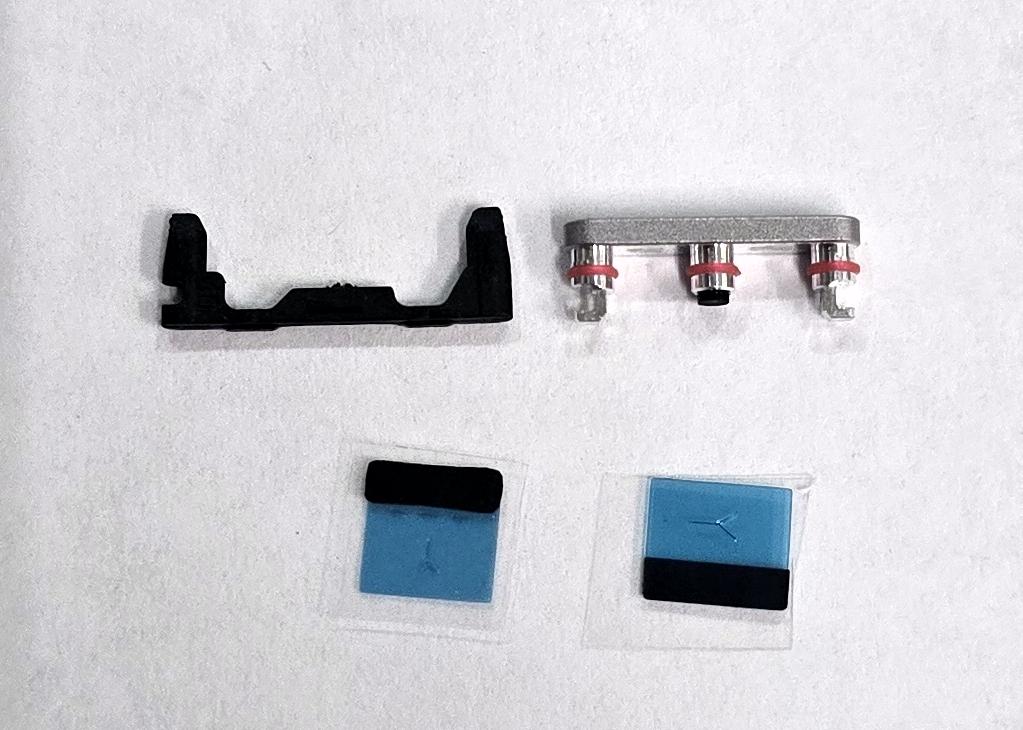
Silver power button set by Oneplus Ace 5 PKG110 Oneplus 13R CPH2691 621036000405 Service Pack
80235
New
Disponible
Warning: Last items in stock!


Volume discounts
| Quantity | Total amount | Price 1 unit |
|---|---|---|
| 5 | €28.13 | Price €5.63 |
Silver Power Button Set for OnePlus Ace 5 PKG110 OnePlus 13R CPH2691 621036000405 Service Pack |
|---|
The silver Service Pack power button set 621036000405 for OnePlus Ace 5 PKG110 and OnePlus 13R CPH2691, CPH2645 and CPH2647 is a replacement assembly designed for the device's side power control. It allows replacement of the button when it is broken, worn, detached or experiencing mechanical actuation problems. Its silver finish helps maintain the appearance of the device, while its model-specific design allows repairs to the power key assembly. This component is intended for professional repair technicians who need to restore power on, power off and screen locking functions through a localized repair.
Specifications |
|---|
- Brand: OnePlus.
- Compatible models: OnePlus Ace 5 and OnePlus 13R.
- Technical models: PKG110, CPH2691, CPH2645 and CPH2647.
- Part Number (Part No): 621036000405.
- Component: Side power button set.
- Color: Silver.
- Quality: Service Pack.
- Replacement type: Power button assembly.
- Function: Activation of power on, power off, screen locking and wake-up functions.
- Location: Side of the device housing.
- Regional compatibility: OnePlus Ace 5 PKG110 (China) and OnePlus 13R CPH2691 (India), CPH2645 (Europe/Global) and CPH2647 (North America).
Advantages |
|---|
The Service Pack power button set for OnePlus Ace 5 and OnePlus 13R allows repair of the side actuation assembly when it shows physical damage, wear or pressing difficulties. Its silver finish helps preserve the uniform appearance of the phone and provides a specific solution for restoring normal operation of the power key.
Part number 621036000405 is identified for technical models PKG110, CPH2691, CPH2645 and CPH2647, facilitating replacement selection when repairing devices from different markets. Its assembly format allows technicians to focus on the affected component without replacing housing elements that remain in good condition. This part is particularly useful for workshops performing side button repairs and maintenance on OnePlus devices.
Installation Tips |
|---|
- Switch off the device, disconnect the battery before handling internal components and use ESD protection.
- Carefully access the side power button housing following the corresponding disassembly procedure.
- Remove the damaged assembly without affecting the mounting points or nearby components.
- Clean the housing and check the condition of the actuation mechanism before installing the replacement.
- Position the new assembly according to its correct orientation and alignment, avoiding excessive pressure on nearby flex cables and connectors.
- Check that the button has the correct travel and returns to its position after each press.
- Verify the power on, power off, screen locking and wake-up functions before completing reassembly. Replace removed adhesives and check the housing closure where applicable.
Technical Table |
|---|
Brand | Compatible Models | Technical Model | Part Number (Part No) | Component Type | Color | Quality |
|---|---|---|---|---|---|---|
OnePlus | Ace 5 / 13R | PKG110 / CPH2691 / CPH2645 / CPH2647 | 621036000405 | Side power button set | Silver | Service Pack |


